11.12.25

November Update

In this release, we’re introducing advanced SMS compliance features to ensure SMS success, enhanced reporting flexibility, and expanded customization options for emails and audience management. These updates help marketers maintain compliance with evolving regulations, strengthen brand consistency, and gain deeper insights into performance across channels. They also simplify campaign operations and data organization, so your teams can focus on creating meaningful, personalized experiences at scale.

Let’s take a look at what’s new in November.
 

blank

NEW FEATURE

Fuzzy SMS Unsubscribe

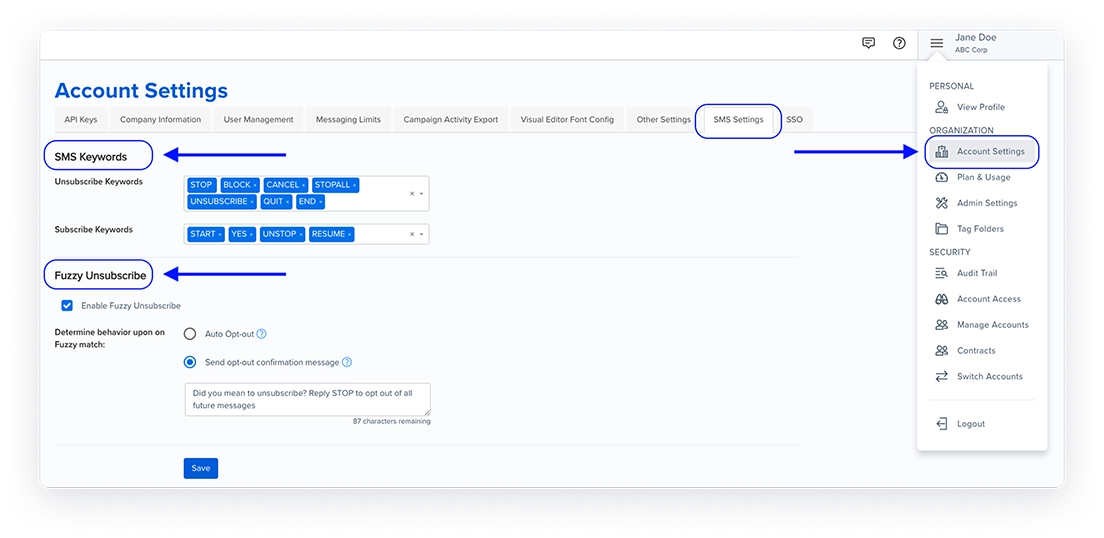
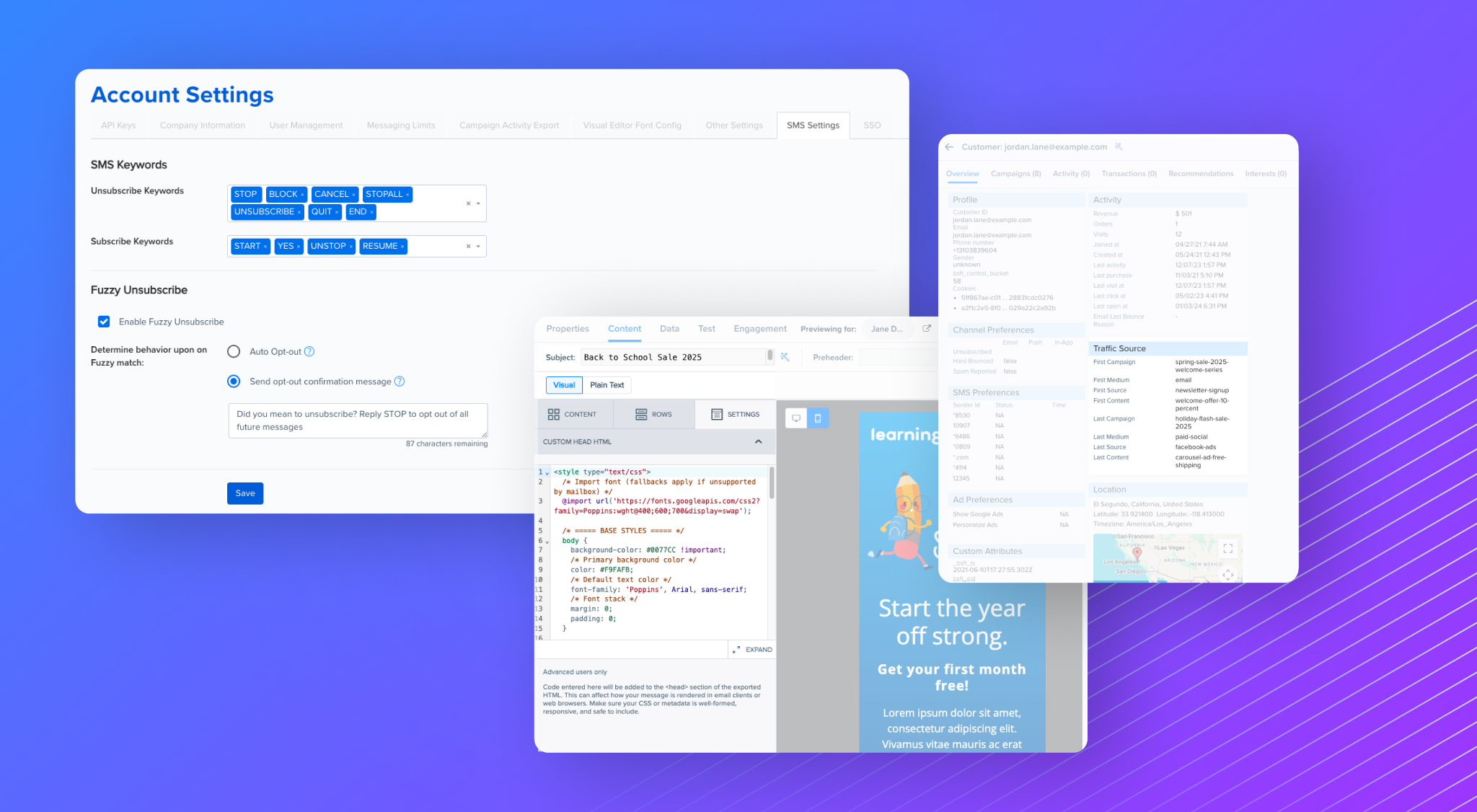
To support compliance with the FCC’s updated TCPA rules, Blueshift now supports fuzzy unsubscribe detection for SMS. These regulations require honoring opt-out requests made in any reasonable manner not just exact keywords like STOP.

With this enhancement, Blueshift automatically detects and processes natural language responses such as “please stop texting me” or “I don’t want these”, helping marketers respect customer intent and reduce spam complaints.A new SMS Settings tab is now available under Account Settings for full-service SMS accounts, consolidating all SMS-related configurations.

You can enable fuzzy opt-out in two ways:

  • Auto opt-out on fuzzy match – Automatically unsubscribe the user when a fuzzy match is detected.
  • Opt-out confirmation on fuzzy match – Send a confirmation message (for example, “Did you mean to unsubscribe? Reply STOP to opt out of all future messages.”).

This update strengthens compliance, protects sender reputation, and keeps SMS lists clean by ensuring only engaged customers remain subscribed.

blank

NEW FEATURE

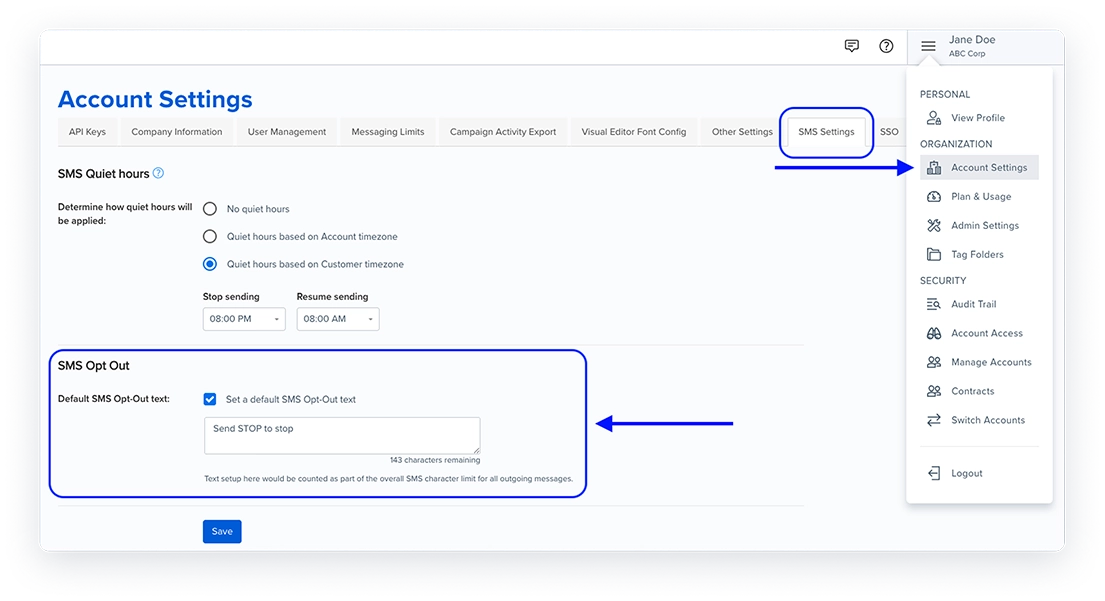
Default SMS Opt-Out Text

To support compliance with the Texas Telephone Solicitation Act, Blueshift now enables adding a default opt-out message to all outgoing SMS messages. This ensures every message clearly communicates how customers can unsubscribe—for example, “Send STOP to unsubscribe.”

A new Default SMS Opt-Out Text section is available under Account Settings for full-service SMS accounts.

Marketers can:

  • Customize the opt-out message text (for example, “Send STOP to unsubscribe.”).
  • Control whether the opt-out message is included at the campaign trigger level.
  • Preview SMS messages in SMS Studio with or without the opt-out text to verify layout and message length before sending.

This update ensures compliance with state regulations while maintaining full control over message presentation and delivery.

blank

NEW FEATURE

Carrier & Country Code Data for Phone Numbers

Blueshift now automatically identifies and stores the carrier name and ISO country code for each phone number, based on data returned by SMS providers.

These new customer profile attributes — phone_number_country_iso_code and phone_number_carrier_name — give marketers deeper insight and control when building SMS campaigns. You can now:

  • Segment audiences by country or mobile carrier.
  • Personalize and localize SMS marketing strategies for regional relevance.
  • Analyze delivery performance and compliance metrics by carrier or geography.

This enhancement improves visibility into SMS performance and enables more precise targeting, segmentation, and reporting across markets.

NEW FEATURE

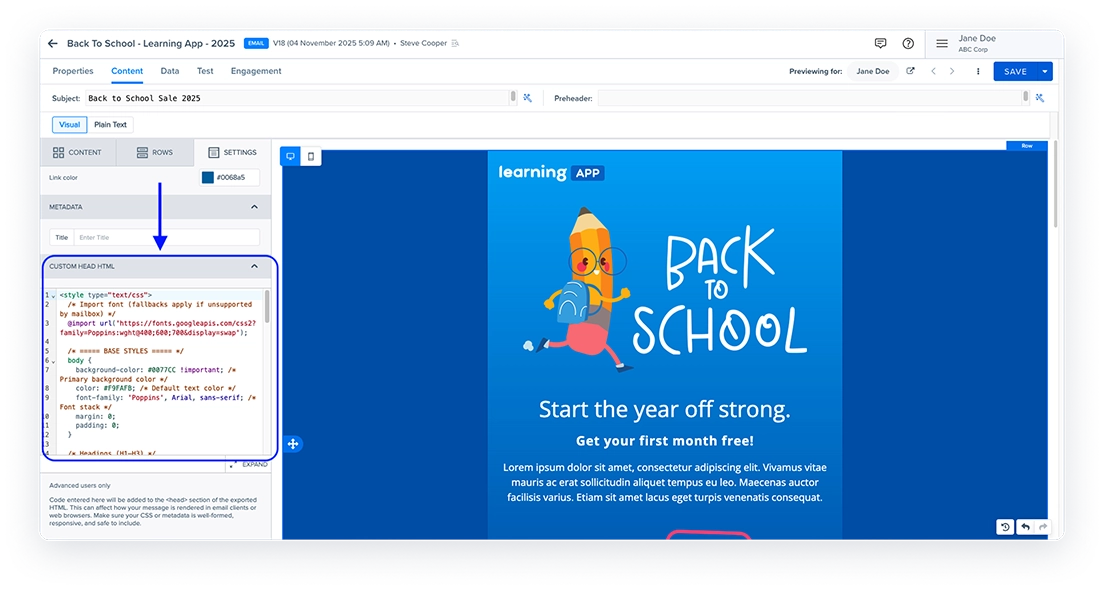
Custom HTML Header for Visual Editor Emails

Blueshift now supports adding custom HTML to the <head> section of Visual Editor email templates, giving marketers greater flexibility and creative control without leaving the visual editing experience.

With this update, you can define global properties such as meta tags, custom fonts, and embedded styles directly within the Visual Editor. This enables advanced design use cases, including:

  • Importing Google Fonts or custom web fonts for consistent brand styling.
  • Applying global color themes and responsive CSS using media queries.
  • Adding personalization meta tags to enhance email metadata.
  • Implementing Google Promotions Annotations to improve visibility in Gmail’s Promotions tab.

This enhancement empowers teams to create fully branded, responsive, and polished emails—unlocking design capabilities previously limited to HTML templates.

blank

ENHANCEMENT

Shared Asset Preview in Visual Editor

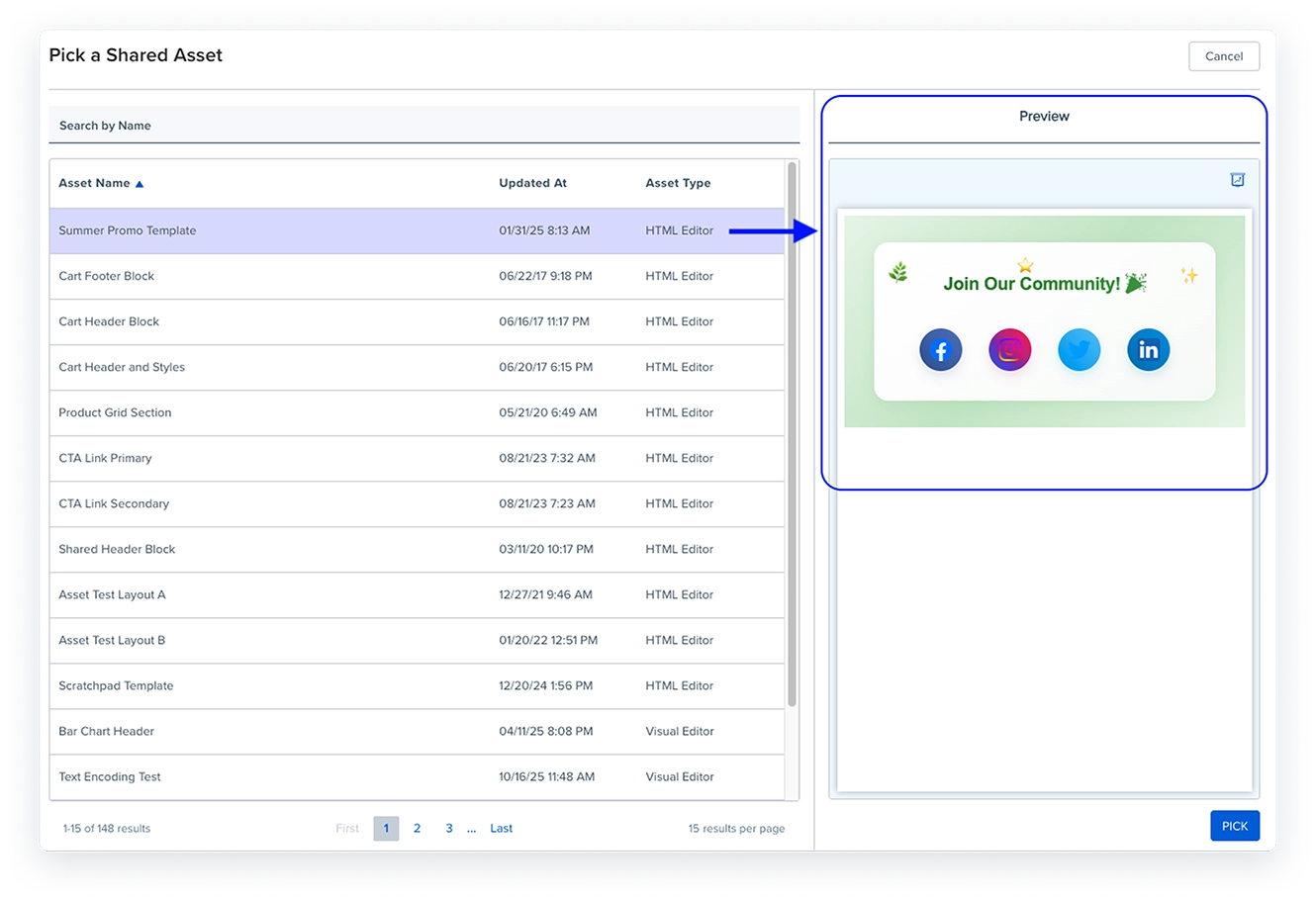
The Visual Editor’s shared asset picker now includes a live preview panel, allowing you to view assets before inserting them into your template.

When you select a shared asset—such as a header, footer, or content block—a real-time preview appears on the right, making it easier to confirm you’ve chosen the correct version.

This enhancement streamlines the content creation process and reduces errors when working with shared assets across teams and campaigns.

blank

ENHANCEMENT

Restrictions on Classic Recommendation Schemes

Blueshift is officially beginning the transition from the classic (V1) recommendation editor to the newer Photon (V2) recommendation engine.

With this update:

  • Classic (V1) recommendation schemes can no longer be used when creating new templates. If you clone a template that uses a classic scheme, the cloned version will not retain the classic scheme association.
  • Existing campaigns and templates that currently use V1 recommendations will continue to function as expected until January 2026, after which V1 will be fully deprecated.

We encourage all users to migrate to Photon (V2) to benefit from enhanced performance, greater flexibility, and ongoing feature support.

ENHANCEMENT

Compound Metrics in A/B Test Reports

A/B test reports now support compound metrics such as Open Rate (%) and Click-to-Open Rate (CTOR), giving marketers more flexibility in how they measure and compare variant performance.

This update lets you evaluate tests using the metrics that best reflect your campaign objectives, making it easier to identify winning strategies and optimize future experiments.

ENHANCEMENT

Archive Subscription Groups

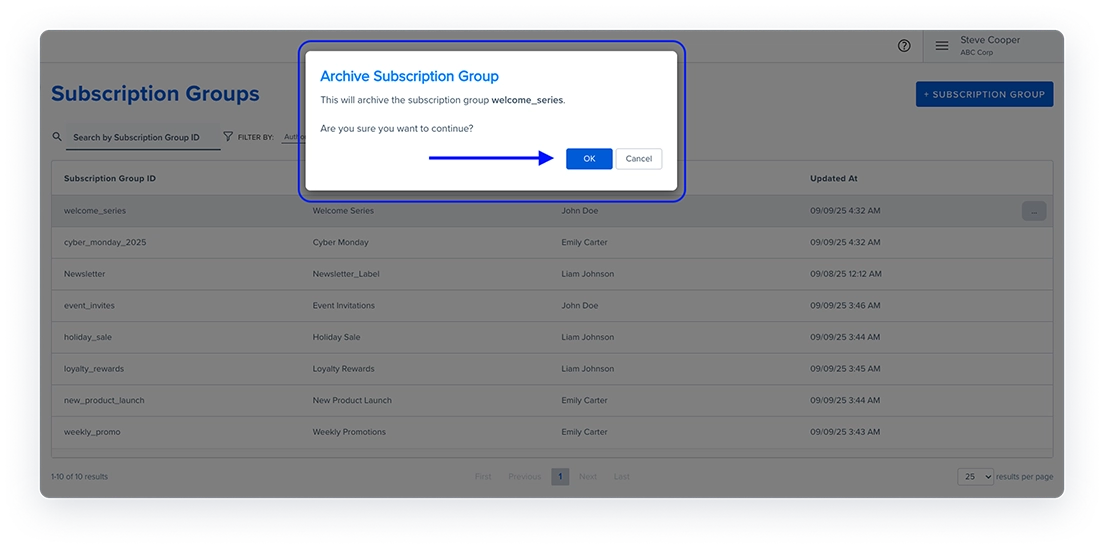
You can now archive subscription groups that are no longer in use, helping keep your subscription data organized and preventing outdated groups from being linked to customer profiles.

Before archiving, Blueshift automatically checks whether the group is used in any campaigns or adapters. If dependencies exist, you’ll see a list of affected items to review before proceeding.

Once archived:

  • The group cannot be associated with profiles, campaigns, triggers, or adapters.
  • It cannot be updated through Identify events, API updates, or imports.
  • It no longer appears on customer profiles.
  • You can filter groups by Active or Archived status on the index page.

This update improves subscription management accuracy and helps marketers maintain a clean, organized data environment.

blank

ENHANCEMENT

Campaign Tag Filters on the Campaign Optimizer Agent Index Page

You can now filter campaigns by tag directly on the Campaign Optimizer Agent index page, making it faster to locate and review related campaigns.

This improvement helps marketers organize and manage optimization efforts more efficiently—especially when working across large campaign portfolios or multiple optimization agents

ENHANCEMENT

Campaign Optimizer Agent Selection During Trigger Creation

The trigger creation flow now allows you to select a Campaign Optimizer Agent before saving. Previously, this option was available only after the initial save.

This improvement streamlines setup by removing an extra step, allowing you to enable campaign optimization earlier in the workflow and configure triggers more efficiently.

ENHANCEMENT

Chronological Sorting for Customer Lists

Customer lists in the Segment Builder dropdown now appear in chronological order, with the most recently created or updated lists shown first.

This improvement helps marketers quickly find and select the most relevant lists when building segments, streamlining the segmentation workflow.

ENHANCEMENT

Traffic Source on Customer Profiles

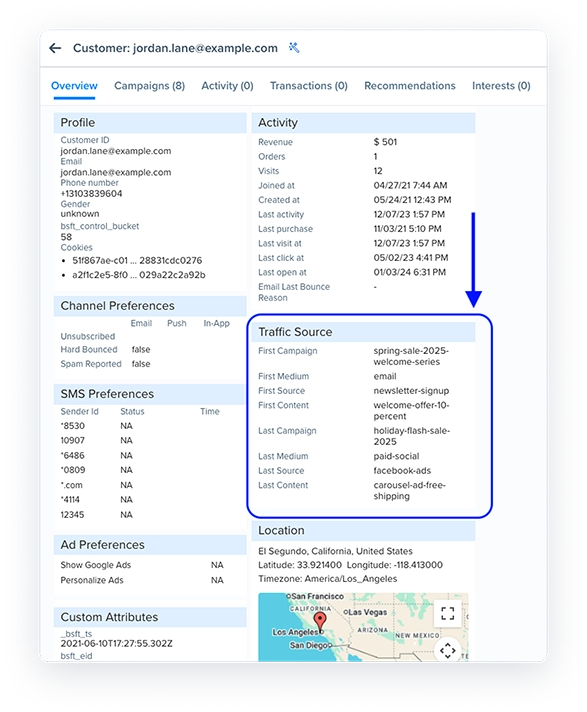
You can now view a customer’s first and last traffic sources directly on their profile. The new Traffic Source section displays detailed UTM parameters, including campaign, medium, source, content, and term.


This visibility helps marketers understand how customers initially discovered your brand and which channels drove repeat engagement, enabling more informed attribution and targeting decisions.

blank

ENHANCEMENT

Attribute Grouping in Data Update Triggers

The Data Update trigger now organizes customer attributes into clear categories—Standard, Custom, and Derived—within the attribute selection dropdown.

This improvement simplifies finding and selecting the right attributes, especially when managing large attribute lists, making trigger setup faster and more intuitive.

ENHANCEMENT

Support Dropdown Enhancements

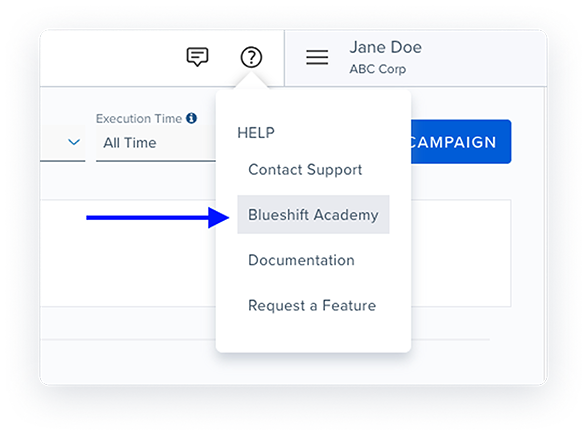
The Help (?) menu has been updated to improve accessibility and clarity. It now includes a direct link to Blueshift Academy for easy access to training resources.

Additionally, the “Ask a Question” option has been renamed to “Contact Support” to better reflect its purpose and streamline user navigation.

blank

ENHANCEMENT

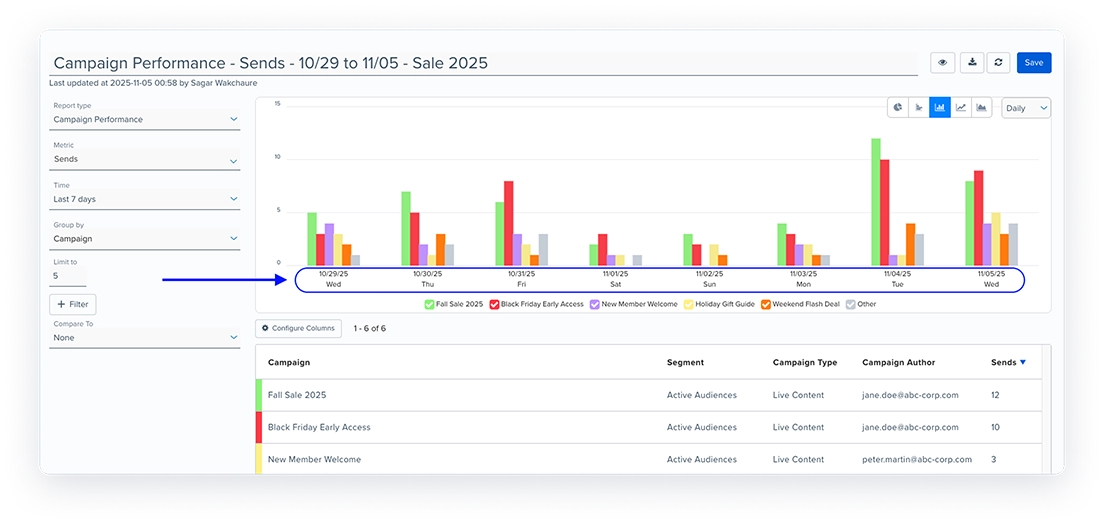
Day of the Week in Campaign Performance Reports

blank

ENHANCEMENT

Revamped Recommendations Documentation

We’ve redesigned the Recommendations documentation to make it easier for marketers to explore, understand, and apply Blueshift’s recommendation engine and recipe framework.

The new experience includes:
• Structured view of all available recommendation recipes
• Search and filter by industry or lifecycle stage
• Detailed recipe cards outlining description, requirements, and configuration steps

ENHANCEMENT

Android SDK Documentation Refresh

We’ve updated the Android SDK documentation to make setup and integration easier for developers and teams implementing mobile engagement.

The new experience includes:
• Step-by-step setup and integration guidance
• Clear explanations of common implementation scenarios
• Updated code samples for faster onboarding and smoother integration

An iOS SDK documentation refresh will follow soon.